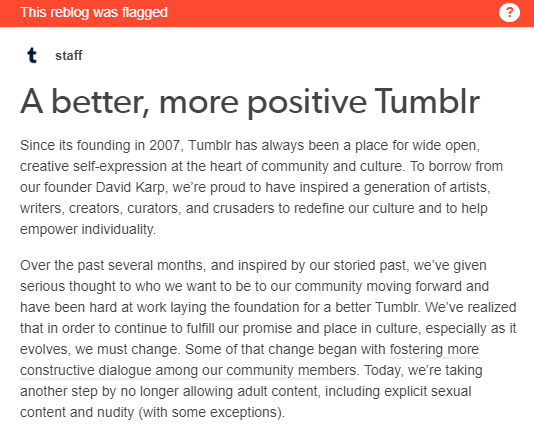
Sounds drastic. Especially for content creators who may still need Tumblr for commissions while they find an alternative.
If you can swing it, here’s why:
I suspect that the December 17th deadline is so that Verizon/Yahoo can clean house and make Tumblr appealing to investors. This is a Q4/Q1 fire sale kind of thing. It makes a certain amount of business sense to make this change. Human-lead content curation (e.g. separating the CP from the legit) is expensive and time-consuming. I doubt they have the money for it. They already sold off Flickr. As a long-time Flickr pro user, I’m not pleased by the change and increase in pro account price, but I get it.
Investors are looking for a user base. User base is a prime attraction for investment or buy-out for a social media platform or application (I speak from experience as a co-founder of Rhinobird.tv).
Every account that is cancelled will be one less account in Tumblr’s user base for their pitch. I assume that there are millions of accounts with some percentage simply being abandoned accounts that haven’t been used in years. So cancelling one’s account on the way out the door won’t really matter unless the number of cancelled accounts reaches several hundred thousand at least.
If you decide to leave and cancel, then I also recommend sending a polite message to Tumblr staff, or tweet to the account about why you are leaving.
Finally, using Twitter to voice your concerns and thoughts about this issue will increase its visibility. They ain’t gonna like that. Media outlets that cater to tech entrepreneurs, and Silicon Valley types are going to be all over this.
I never ask for reblogs, but I will this one time.
this post will be updated as I find more websites to add! please check with the original before reblogging to see if there’s an updated version, and message me with corrections or more suggestions if you have them!!
websites in red have explicitly forbidden the posting of NSFW content.websites in orange allow certain types of NSFW content or have questionable / unclear guidelines.
instagram.com – photo and video posts, excellent tag search
newgrounds.com – an oldie but a goodie, allows a ton of media types
piczel.tv – allows both streaming and posting art / photosets to a gallery
pixiv.net – huge anime art community, allows livestreaming
poizen.me – gorgeous website designed for artists to post art AND track comms
this one’s still in alpha but looks incredibly promising as a platform and super pretty to look at!! go snap up a username before all the good ones are taken! favouritism what’s that
vero.co – app only, similar to insta but with MUCH more privacy control
chat or forum based
aminoapps.com – community-based, has blogs + chat, custom themes
discordapp.com – great chat app, text + voice, can join infinite servers
reddit.com – literally a community for everything, SO MANY CAT PHOTOS
18+ only
bdsmlr.com – microblogging + social media for people into kink
blogr.xxx – a tumblr clone created specifically for sharing porn
fetlife.com – considered one of the biggest kink communities online
libertine.center – beautiful + modern site for posting irl nsfw and kink stuff
thefetlibrary.com – for posting of erotic stories, replaces bdsmlibrary
paid platforms
patreon.com – subscription-based access to many diff types of content
pillowfort.io – still in beta, but should function almost identically to tumblr
typepad.com – similar to wordpress but with reblogging and a dash
defunct platforms
(so people will stop telling me i forgot them)
jux.com – shut down in 2014 due to lack of funds
shoandtell.me – now redirects to someone’s personal blog
soup.io – more or less closed down this year due to GDPR issues
ways to save your current tumblr posts
use the wayback machine! you do have to archive each page of your blog individually but once you do all the content, including media, will be saved exactly as it was at the moment you archived it.
wordpress allows you to directly import whole tumblr blogs, and if i recall correctly it’s something both dreamwidth and pillowfort have said they are working on.
if you have some knowledge of computers you can try this github solution which uses a python script to download your whole blog to your computer. even if you don’t know anything about programming or the command line they give a very good beginners tutorial on how to use it so you should still give it a shot!
if that’s still a little daunting you can try soarcodes’ tumblr post that also has a decent tutorial!
some notes
please note that every site on this list will have pros and cons, and i haven’t listed them here since this post would be a mile long otherwise. please do your research before moving completely over to another site in case they have policies you disagree with.
also, because I see a lot of misinformed people ranting about this: deviantart does not own the art you post. some years ago hot topic stole a ton of art from DA and sold it on merchandise and people assumed that DA gave them permission to do it despite there being literally zero evidence for that claim. DA explictly states in their TOS that you retain copyright and sole license of the art you post.




 TheWanderingSunset2